Open research software · MIT license
FWIGAN: full-waveform inversion with PyTorch
A research toolkit for 2D acoustic full-waveform inversion (FWI) and adversarial FWIGAN using DeepWave and PyTorch, with shared configuration, evaluation, and checkpoint/resume workflows.
- Python 3.10
- PyTorch 1.13.1
- DeepWave 0.0.9
- CPU and optional CUDA
What is FWIGAN?
FWIGAN is a Python research toolkit for 2D acoustic full-waveform inversion. It provides conventional FWI and adversarial FWIGAN with shared configuration, DeepWave wave physics, evaluation, and checkpoint/resume workflows.
How do FWI and FWIGAN differ?
Conventional FWI fits raw observed waveforms with a least-squares objective and a known fixed source. FWIGAN uses an adversarial critic with the original per-trace normalization and can fit the source waveform; its noisy variant also fits a noise parameter. The methods have different objectives, so a lower training loss does not by itself establish a better velocity model.
How does FWIGAN use PyTorch?
PyTorch supplies the trainable tensors, critic, automatic differentiation, and optimizers. The pinned DeepWave 0.0.9 backend computes acoustic wave propagation. This repository uses a legacy stack: Python 3.10 and PyTorch 1.13.1, with Torch installed before compiling DeepWave.
How do I install FWIGAN?
From a checkout of the repository, use Python 3.10 and a C++ compiler. These are the README’s pinned CPU installation commands, in order:
python3.10 -m venv .venv
source .venv/bin/activate
python -m pip install setuptools==69.5.1 wheel==0.45.1
python -m pip install torch==1.13.1+cpu --index-url https://download.pytorch.org/whl/cpu
python -m pip install numpy==1.23.5 scipy==1.10.1
MAX_JOBS=2 python -m pip install --no-build-isolation deepwave==0.0.9
python -m pip install -e '.[test,plot,notebook]'
How do I run a small example?
Run the tiny CPU preset from the repository root. The command prints a new run directory.
fwigan invert --config configs/tiny-fwigan.yaml --output-root runs --max-batches 2Use configs/tiny-fwigan-noisy.yaml for noisy FWIGAN or configs/tiny-fwi.yaml for conventional FWI. Full Marmousi presets are available in configs/marmousi-*.yaml.
Source: README installation and quick start.
Does FWIGAN require a GPU?
No. The tiny examples run on CPU. CUDA is optional and requires a compatible PyTorch/DeepWave build; the documented GPU stack uses Torch 1.13.1+cu117 and a CUDA 11.7 toolchain. The CLI does not allocate a GPU. Validate compatibility on the actual device using the CUDA setup and integration instructions.
What do the Marmousi results show?
Original-notebook and package FWIGAN runs with clean and noisy data completed 120 epochs on one NVIDIA A40. Every case began at the same velocity RMSE of 478.003 m/s. The table reports the measured model error against coarse Marmousi truth.
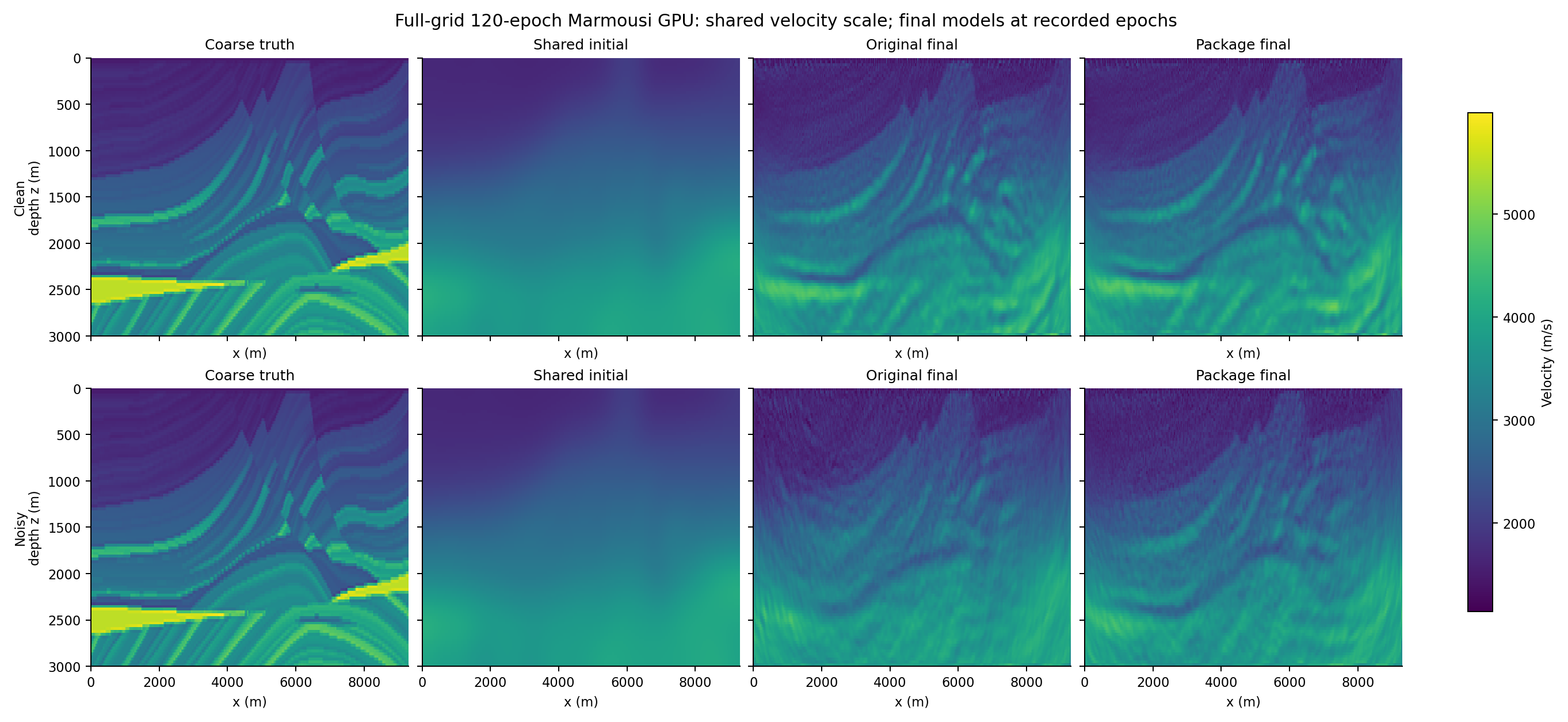
| Implementation | Target data | Initial | Epoch 120 | Source metrics |
|---|---|---|---|---|
| Original notebook | Clean | 478.003 | 432.333 | Original clean JSON |
| Package | Clean | 478.003 | 412.915 | Package clean JSON |
| Original notebook | Noisy | 478.003 | 464.579 | Original noisy JSON |
| Package | Noisy | 478.003 | 462.523 | Package noisy JSON |
These are single-run trajectories covering 120 of the original study’s 401 epochs. Matched starts produced materially different final fields. This evidence does not establish numerical equivalence, full convergence, method superiority, or a general GPU speedup. Package training-only times were lower in the measured pairs, while whole-notebook wall times were higher.
Read the full 120-epoch comparison for the executed notebooks, exact metrics, timing boundaries, and limitations. The separate 20-epoch comparison and validation record provide additional context.
Can I resume a FWIGAN run?
Yes. Resume a package run from its saved checkpoint and evaluate its run directory. Replace <run-id> with the directory printed by the inversion command:
fwigan resume runs/<run-id>/checkpoint.pt --device cpu
fwigan evaluate runs/<run-id>
Keep run.json, config.json, and observations.pt with the checkpoint. Resume restores the same run’s physical state, critic, optimizers, schedules, progress, and random states. Only load trusted checkpoint files.
The public 120-epoch evidence bundle omits the large full resumable checkpoint, so it cannot resume that exact A40 run. See the checkpoint and warm-start documentation and the run’s artifact limits.
How should I cite FWIGAN?
Use the repository’s CITATION.cff and cite the software version or commit you used. The original author is Muhammad Izzatullah. This toolkit is released under the MIT license.
Software metadata: FWIGAN; version 0.1.0; Python; Python 3.10. The machine-readable record is available in codemeta.json.
Scientific sources and related work
The repository credits the following sources as inspiration. Cite the relevant scientific work alongside the software when it informs your research:
- Physics-informed adversarial geophysical imaging — the scientific source linked by the repository (arXiv:2109.11452).
- CryoGAN — related adversarial reconstruction work linked by the repository (IEEE document 9483649).
Where is the full documentation?
- READMEInstall, quick start, notebooks, and attribution.
- Workflow and architectureConfiguration, physical contracts, artifacts, and checkpoints.
- Performance evidenceCPU measurements, CUDA setup, and numerical limits.
- Tests and validationExecuted checks and known scientific limits.